The 401 is the map: three OAuth primitives in my private MCP servers
Table of contents

The whole post in one picture: the 401 hands the client a map, and the route runs through three stations. The door sign is discovery, the desk is registration, the key is the grant.
When I closed the transports post, I said the transport took me ten seconds and the auth story was the part I actually had to think about. This is that post. I owed you an MCP OAuth story in print, and here it is, told the only way I know how to tell these things: from a server I actually run.
The server is mcplex. It is a private thing I built for myself, because my MCP servers were scattered across half a dozen Workers and I wanted them in one place. It registers those servers, groups them into bundles, and exposes each bundle as a single MCP endpoint, plus a Code Mode endpoint that presents a bundle’s tools as a callable API instead of a tool list.1
It is not open source, at least not yet. I keep going back and forth on whether it wants to be a product, and we all know how little money there is in developer tooling of this shape. So unlike the Pustak post, I cannot point you at the repo. What I can do is better: I can show you the live wire. Everything below is a real response from the production server, and Claude connects to it through this exact flow today.
Here is the thing about MCP OAuth that nobody tells you upfront. The spec reads like alphabet soup: OAuth 2.1, RFC 9728, RFC 8414, RFC 7591, PKCE, DCR. Every one of those has its own document and its own diagram, and reading them in a stack teaches you almost nothing about what your server actually has to do. But watch one client connect, just once, end to end, and the soup collapses into three primitives that fire exactly once each, in a fixed order. So that is what we are going to do: follow one connection.
The anonymous knock
A fresh client, say Claude with a new connector, POSTs to a bundle endpoint with no token. Here is what the live server sends back:
HTTP/2 401
www-authenticate: Bearer resource_metadata="https://mcplex.prashamhtrivedi.app/.well-known/oauth-protected-resource", error="missing token"
Your instinct says failure. Your instinct is wrong, and rewiring that instinct is half of understanding MCP OAuth. The 401 is not a rejection, it is the map. The server refuses the request and, in the same breath, tells the client exactly where to learn the rules of getting in. Every MCP OAuth flow in the world starts with this handshake-by-refusal, and once you see it that way the rest of the flow stops being mysterious. The client is never lost. It is following directions the server itself handed out.
Primitive one: the discovery documents
The client follows the pointer from that header and GETs it. This is RFC 9728, which is a mouthful of a number for what amounts to a door sign:
{
  "resource": "https://mcplex.prashamhtrivedi.app",
  "authorization_servers": ["https://mcplex.prashamhtrivedi.app"],
  "scopes_supported": ["mcp"],
  "bearer_methods_supported": ["header"]
}
One field matters more than the rest: authorization_servers. The door sign names the bouncer. And notice something about my server: the resource and the authorization server are the same origin. That is allowed, and for a private server it is the sane default. One Worker, two hats. The thing guarding the tools and the thing minting the tokens are the same deployment, but the protocol still makes them introduce themselves separately, because for bigger setups they genuinely are different systems.
The client then fetches the bouncer’s own card, the RFC 8414 authorization server metadata, and this one is the business card of the whole operation:
{
  "issuer": "https://mcplex.prashamhtrivedi.app",
  "authorization_endpoint": ".../oauth/authorize",
  "token_endpoint": ".../oauth/token",
  "registration_endpoint": ".../oauth/register",
  "grant_types_supported": ["authorization_code", "refresh_token"],
  ...
}
Three endpoints on one card: where to register, where to ask, where to collect. That card is the entire remaining flow, spelled out in advance. Two GET requests, zero credentials, and the client now knows everything it needs.
Primitive two: registration, without a developer console
Now comes the step that feels alien if you learned OAuth in the web app era. Back then, before any code ran, a human went to a developer console, created an “app”, copied a client id and secret into a config file, and that ceremony was so universal you probably never noticed it was a ceremony.
MCP throws it out. Nobody pre-registers Claude on my server. There is no console. Instead the client POSTs its own details to that registration_endpoint and gets a client id back on the spot.
This is RFC 7591, dynamic client registration, and it is the piece that makes the whole ecosystem work, because I cannot know in advance which of the dozens of MCP clients in the world will knock on my server next, and I have zero interest in maintaining an approval queue for them. The developer console is an endpoint now. Any client can introduce itself, at any time, unattended.
If you are wondering why this could not just be an API key: this is why. An API key assumes I know the caller ahead of time and can hand a secret over some side channel. DCR assumes the opposite, and the opposite is the truth for MCP. The clients are strangers, and the protocol is built so strangers can arrive properly.
Primitive three: the grant, where a human enters the loop
Everything so far was machines reading signs. Now the one human moment. The client opens the authorization endpoint in a browser, carrying a PKCE challenge.2
What the person sees depends on whether they already have a session with mcplex’s website. Mine runs on GitHub sign-in or an email OTP, and the OTP mails are sent by another MCP server of mine, which does transactional email.3 If you are already signed in, there is no second login. You land straight on a consent screen that names the client asking for access, you click approve, and you go back to whatever you were doing.
That click does more than it looks like. At the moment of consent, the server bakes the user’s identity into the grant itself, as properties that travel with it: which user this is, which slug their content lives under. This is the part I want you to keep: identity is decided once, at consent time, and never again. Every request after this just unwraps what consent already decided. No per-request lookup of “who is this token again”, no session store consulted on the hot path. The grant carries its own passenger manifest.
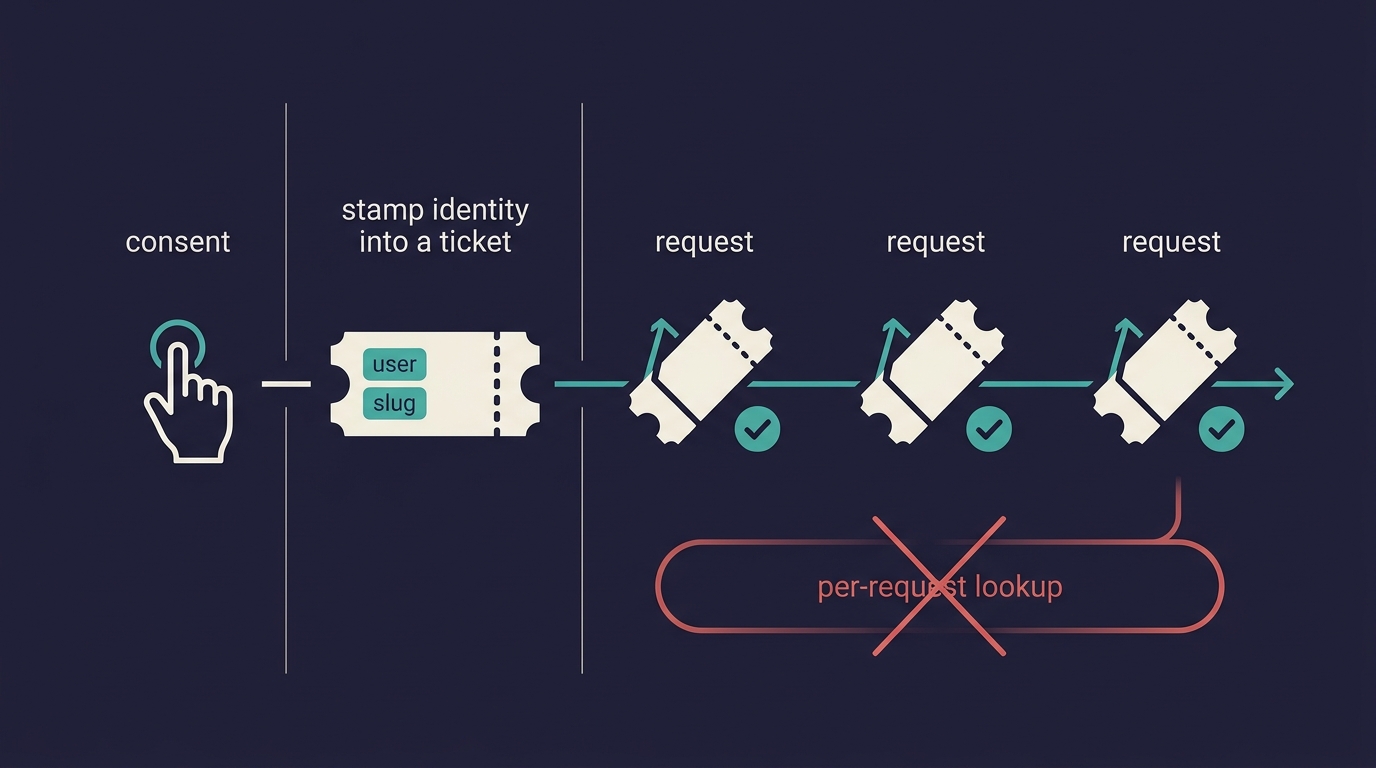
The client then swaps its authorization code at the token endpoint and receives an access token good for 24 hours, plus a refresh token so the human never sees this dance again. The 24 hours is my choice, not the spec’s; the refresh grant you can see advertised in the metadata above.
The authorized knock
Same endpoint as step one, same POST, one new header. The server unwraps the token, the identity properties fall out of it, and now an ownership check runs before any tool executes. Ask for a bundle that is not yours and you get a flat 403 telling you exactly that.
One token covers all of that user’s bundles. That was a deliberate trade: per-bundle grants would be more granular, and they would also mean re-consenting every time I create a bundle. For a single-owner server that granularity buys nothing. And because grants are real objects, revocation is a page, not a support ticket: my account screen lists every connected client, each with a revoke button.
That is the whole flow. Three primitives, in order: discovery documents that turn a 401 into a map, dynamic registration that replaces the developer console, and a grant that binds a human’s one-time consent to every future request. Walk it yourself:
What the MCP OAuth docs will not tell you
The flow above is the spec working as designed. Shipping it took three hacks the docs never mention. You will hit some cousin of each one, and that is why this section exists.
The library’s routing model will not match your URLs. I build on Cloudflare’s OAuth provider library for Workers. It guards API routes by fixed path prefix, and my protected endpoints are dynamic: every user and every bundle has its own path, so no prefix can cover them. My fix: the library gets a dummy API route that always 404s, purely to keep its config happy, and my own middleware does the real bearer-token check, rejecting bad tokens with the proper WWW-Authenticate header. The library still owns registration, authorization, and tokens. The gate is mine now.
The library hardcodes its storage binding name. It expects a KV namespace bound under one specific name, with no way to configure it. I did not want a second namespace just for three key types, so both bindings point at the same physical namespace. That is safe only because the library prefixes its keys and mine never touch those prefixes. It works, and it has a comment in the config, because six months from now it will look like a mistake to whoever finds it. Probably me.
One discovery document you will serve by hand. The authorization server metadata comes free with the library. The protected resource metadata, the very first document in the flow, does not. So mine is hand-served, and it builds its URLs from the incoming request’s origin instead of a configured hostname. That one choice gives local dev and production correct metadata with zero per-environment config, and it removed a whole class of “works locally, breaks deployed” from this system.
None of this is a complaint about the library. Young ecosystems look like this at the code level: the spec is ahead of the tooling, the tooling is ahead of the docs, and people ship across the gap anyway. I said the same thing about client support for Resources and Prompts, and auth is just the next place the pattern repeats.
The mirror I did not expect
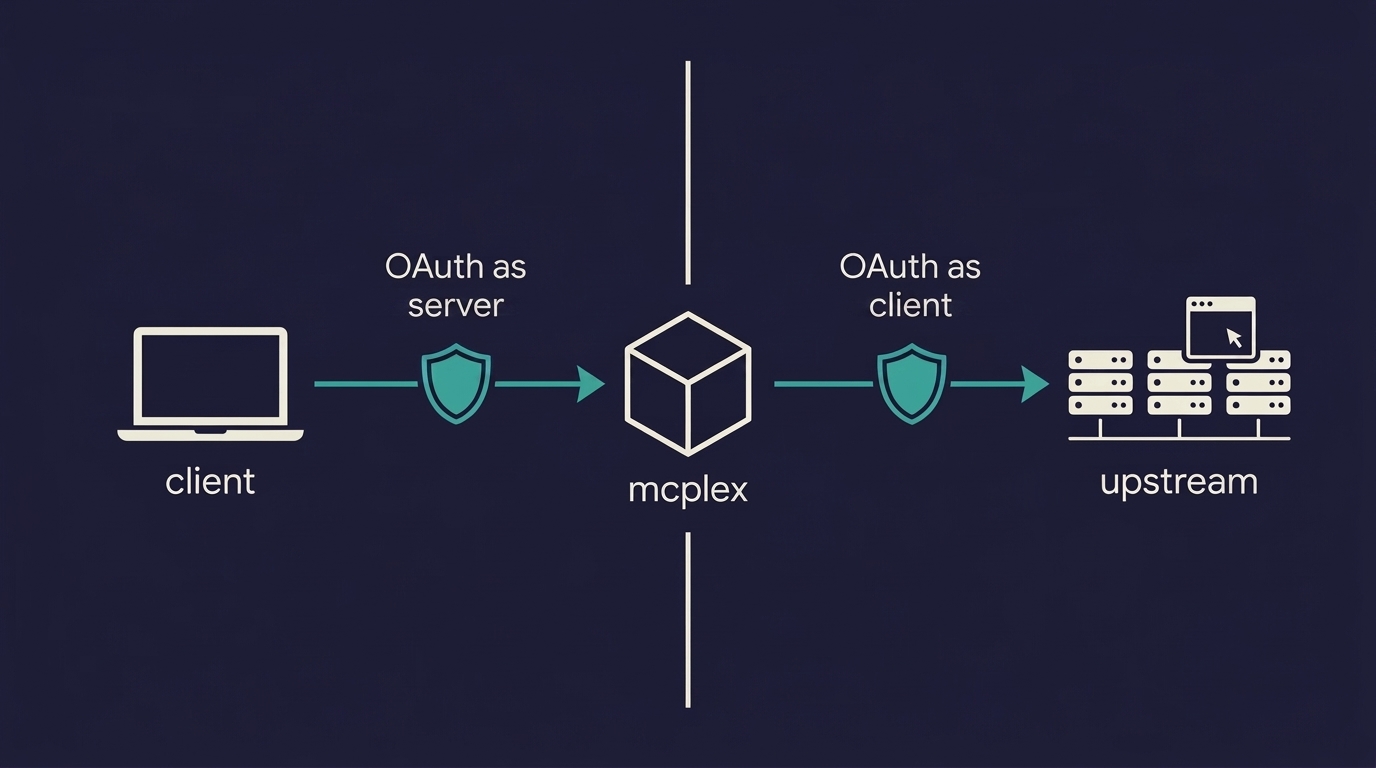
Here is the twist that made me actually like this system. mcplex does not just receive OAuth. It performs it, in the opposite direction, at the same time.
Remember what the server does: it bundles my other MCP servers. Some of those upstream servers demand their own OAuth. So when a bundle connects upstream, mcplex is suddenly the client in somebody else’s version of this exact post: it reads their 401, fetches their discovery documents, registers itself dynamically, and pops a browser window for my consent. The completion even arrives as a little popup that posts a message back to the opener window and closes itself, which is the same trick every “connect your account” button on the web has used for a decade.
The same three primitives, walked from the other side. And doing it manually, as a server author, buys you something no diagram can: an appreciation for how much invisible work Claude and every other MCP client have been doing on your behalf every time you clicked “connect” and it just worked.
The other answers in my fleet
mcplex is one server’s answer. Across the rest of my fleet the same question got answered differently every time, and honestly, that spread is the real state of MCP auth in mid-2026. vaatchitra, my recordings and transcripts app, gets OAuth through Better Auth’s MCP plugin, riding the same login its website already had. My email sender wraps OAuth around an API key: the consent screen literally asks you to paste one, and OAuth is just the envelope MCP clients expect it in.
My personal memory server runs a hand-rolled OAuth 2.1 with self-minted JWTs, which I can defend only because I am its sole user and it will stay that way. My link shortener holds out with a single static bearer token, stdio servers get the process boundary for free, and one server of mine, I will admit, still answers anonymously while it waits for its turn in the auth queue. Every one of those is its own trade, and most are a story for another day.
And past all of this sits the enterprise version of the question, where organizations want employees to inherit access from an identity provider without ever seeing a consent screen. That world is arriving through an extension called Enterprise-Managed Authorization, and it is additive: everything this post described keeps working underneath it.
The transport was a ten-second decision once I knew the rule. Auth turned out to be three primitives, met in the order they fire, plus three hacks nobody warned me about. Now that you have walked it once, the alphabet soup should read like a map too.
May the force be with you…
Code Mode is the “present the tools as a TypeScript API and let the model write code against it” pattern, which exists for token-cost reasons I worked through in No, MCP servers aren’t dead. ↩︎
PKCE, if you have not met it: the client invents a secret, sends a hash of it now, and proves it holds the original later at the token exchange. It is what lets a public client, one that cannot keep a client secret, still do the authorization code flow safely. MCP clients are public clients almost by definition, so PKCE is not optional garnish here, it is the load-bearing wall. ↩︎
Yes, my MCP server’s login emails are delivered by another of my MCP servers. The fleet feeds itself. This is either dogfooding or a single point of failure with excellent branding, depending on the day. ↩︎